How do I change the master QCS site from one site to another?
Sometimes you may wish to change the QCS master site to another site. To do this you will need to do the following steps:
- Open QCS and [Edit] the contract you wish to change the ownership of the master site module.
- Open the on "Import / Export | QCS" module.
- Click on the [QCS Sites] button. (If this button does not exist, simply put a checkmark in the box labeled Will QCS be used at a remote QCS site?)
- If the remotes site that you wish to become your new master site is not in the Remote QCS Sites list, you will need to add a new remote site. See the article titled How do I add a remote QCS site?
- Once the remote site that you wish to become the master site appears the Remote QCS Sites list you can then assign the Master Site module to that remote site. To do that follow the steps below:
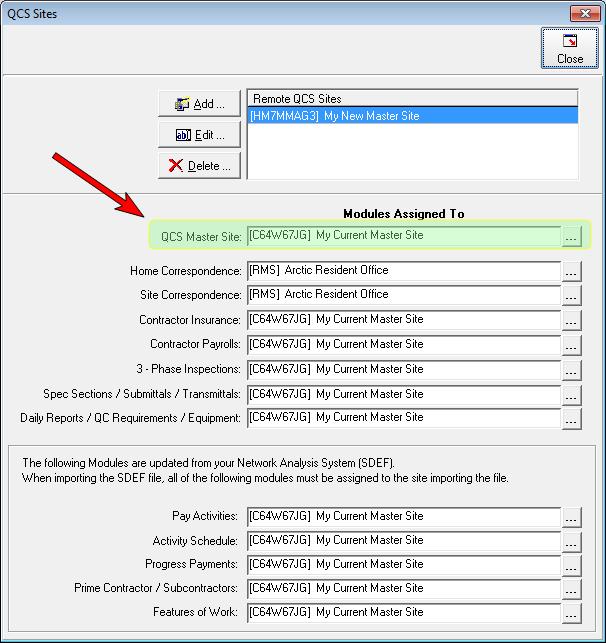
- Find the module labeled QCS Master Site. It is the first module under the title Modules Assigned To.
- Click on the button with the three dots, [...]. QCS will first ask for confirmation that you wish to change the master site.
- If you confirm the change QCS will then list all of the remote sites and ask you which remote site is to be the new master site.
- Perform an export to QCS and once the remote site imports your export file they will be the new master site.
- Find the module labeled QCS Master Site. It is the first module under the title Modules